

Shopping for a horse camera can sometimes feel like learning a completely new language.
You start researching stable cameras, paddock cameras or horse trailer cameras and suddenly find yourself reading about 4G, WiFi, Bluetooth, SIM cards, playback, live viewing and HD video. Before long, you may be wondering what these terms actually mean—and which features you really need.
The good news is that horse camera technology is much easier to understand once the terminology is explained in plain English.
Knowing the difference between 4G, WiFi and Bluetooth-style connectivity can help you choose a horse camera that will work reliably in your intended location. Understanding playback, video quality and storage will also help you get more value from your camera once it is installed.
Whether you want to monitor a foaling mare, check a horse recovering from injury, watch your paddocks from work or keep an eye on your horse while towing, this glossary explains the horse camera lingo you are most likely to encounter.
You can also explore the complete range of Equine Eye horse cameras for stables, paddocks, floats, trailers, trucks and goosenecks.
4G
A 4G horse camera connects to the mobile phone network in much the same way as a smartphone.
Instead of relying on the WiFi connection at your house or stable, the camera uses mobile data to send footage to an app on your phone. This means you can view the camera remotely from home, work or even while travelling overseas, provided the camera has a suitable mobile signal.
The Equine Eye Vision 4G Camera uses this type of connection. It is designed for paddocks, stables, trailers and other locations where power and WiFi may not be available.
A 4G horse camera can be particularly useful for:
-
Monitoring foaling mares
-
Watching horses recovering from illness or injury
-
Checking horses on box rest
-
Monitoring remote paddocks
-
Keeping an eye on horses at agistment
-
Checking stables while you are away
-
Monitoring gates, sheds and other areas of a horse property
One of the main advantages of 4G is that the distance between you and your camera is not restricted by a direct connection. Your camera connects to the mobile network, while your phone accesses the footage through the internet.
However, a 4G camera does need adequate mobile coverage where the camera is positioned. If your phone receives little or no mobile signal in that location, a 4G camera may also struggle to stream video reliably.
Bluetooth
Bluetooth is a short-range wireless technology commonly used to connect devices such as headphones, speakers and car audio systems.
In horse camera discussions, the word Bluetooth is sometimes used informally to describe a direct, short-range connection between a camera and another device. However, not every camera described as working “similarly to Bluetooth” uses Bluetooth itself.
For example, the Equine Eye Voyager Camera uses a direct LAN connection between the camera and your phone. It works in a similar way to Bluetooth from a customer’s perspective because the phone must remain relatively close to the camera.
The important difference is that the Voyager does not need phone reception, mobile data or an external WiFi network. The camera and phone communicate directly, making it particularly suitable for standard cars and horse trailers.
Bluetooth itself is not normally used to send high-quality video over unlimited distances. When you see the term in relation to a horse camera, check whether it refers to the actual connection technology, the initial pairing process or simply a short-range connection that behaves in a similar way.
WiFi
WiFi allows devices to connect to the internet through a local wireless network, usually provided by a modem or router.
A WiFi horse camera can work very well when installed inside a barn or stable with a strong, reliable internet connection. However, WiFi only works within the area covered by the network.
A camera positioned 100 metres from the house, behind stable walls or inside a metal shed may not receive a strong enough signal, even when the internet works perfectly inside the home.
Before purchasing a WiFi camera, test the signal at the exact installation point. Standing at the back door and checking your phone is not enough if the camera will be mounted at the far end of the stable block.
WiFi cameras can be suitable for:
-
Indoor stables close to the house
-
Barn aisles
-
Tack rooms
-
Feed rooms
-
Covered yards with strong network coverage
For off-grid paddocks or stables without WiFi, a 4G option such as the Equine Eye Vision may be more practical.
The Equine Eye Voyager and Equine Eye Venture do not require an external WiFi network while you are towing. They create direct wireless connections between the relevant devices instead.
SIM card
A SIM card allows a 4G horse camera to connect to a mobile data network.
It performs a similar role to the SIM card in your phone. However, rather than allowing the camera to make ordinary calls, it provides the data connection required to transmit live video, alerts and recordings.
The Equine Eye Vision requires a data SIM because it is a 4G camera. Once the SIM is installed and has an active data plan, the camera can connect to the mobile network and send footage to the Equine Eye app.
Using a SIM card does not mean the camera needs to be connected to your personal phone plan. It can have its own data service.
The amount of data used will depend on factors such as:
-
How often you watch the live feed
-
How long each viewing session lasts
-
The selected video quality
-
How frequently recordings are uploaded
-
Whether motion alerts are enabled
A SIM card is not required for every horse camera. Short-range trailer cameras such as the Voyager and Venture connect directly to a phone or supplied screen, so they do not need mobile data to operate.
Live viewing
Live viewing means watching what your camera can see at that moment.
When you open the camera app or turn on its monitor, you are viewing your horse in real time rather than watching an earlier recording.
Live viewing can help you quickly check whether:
-
A foaling mare is showing signs of progress
-
A horse on box rest is settled
-
A horse has finished its hay or water
-
A recovering horse is lying down or moving comfortably
-
A horse is travelling calmly in the float
-
A storm has affected a paddock or shelter
The Vision and Voyager send live footage to a compatible phone, while the Equine Eye Venture includes its own dedicated HD screen for monitoring horses during transport.
Playback
Live viewing tells you what is happening now. Playback allows you to review what happened earlier.
This function is especially valuable when something occurs while you are asleep, at work or unable to watch the camera.
For example, you may open the app and see your horse standing quietly, but notice that a motion alert was triggered during the night. Playback allows you to return to the relevant recording and see whether the horse lay down normally, became cast, showed signs of discomfort or reacted to activity outside the stable.
Playback can be useful for:
-
Reviewing a mare’s behaviour before foaling
-
Checking possible colic or discomfort
-
Investigating an unexplained injury
-
Monitoring horses overnight
-
Reviewing motion alerts
-
Checking who entered a stable or paddock
-
Observing how a horse behaves when people are absent
-
Reviewing rehabilitation progress
The Equine Eye Vision can record motion events and allows stored recordings to be played back through the app. Recording storage may use a memory card or compatible cloud service, depending on the selected setup.
Playback turns a horse camera into more than a live viewing device. It creates a record that can help you better understand your horse’s behaviour over time.
HD and SD video quality
HD stands for High Definition, while SD stands for Standard Definition.
These terms describe the resolution and level of detail in the video image. HD footage generally appears sharper and clearer than SD footage, making it easier to see subtle details.
With HD video, you may be better able to identify:
-
Sweating
-
Pawing or weight shifting
-
Changes in posture
-
Small swellings or visible injuries
-
Facial expressions
-
Rugs or boots that have moved
-
How a horse balances while travelling
SD video contains less detail but generally requires less data and bandwidth. It may load more smoothly when mobile reception is weaker and can be useful for quick checks when the sharpest possible image is not essential.
For example, SD quality may be sufficient to confirm that a horse is upright, eating and moving normally. HD may be preferable when closely observing a foaling mare, monitoring a recovering horse or reviewing a potential injury.
The Equine Eye Venture provides 1080P high-definition video through its dedicated HD screen, giving drivers a clear view inside a horse float, trailer, truck or gooseneck. The Equine Eye Voyager also streams clear live footage to a phone, while the Equine Eye Vision is designed for detailed remote monitoring through the Equine Eye app.
It is also important not to confuse SD video quality with an SD card. In the first term, SD means Standard Definition. An SD card is a physical memory card used to store recordings. They are completely different things despite sharing the same abbreviation.
Wireless
“Wireless” simply means that the camera does not need a traditional video cable running from the camera to the viewing device.
However, wireless cameras do not all connect in the same way.
The Vision is wireless because it uses a mobile data network. The Voyager creates a direct connection with a phone. The Venture transmits directly to its included screen.
When comparing wireless horse cameras, ask how the connection works rather than relying on the word “wireless” alone.
Night vision
Night vision allows a horse camera to continue producing a visible image in darkness or very low light.
This is particularly important because many situations that require close monitoring occur overnight. Foaling, illness, colic symptoms and changes in stable behaviour do not only happen during daylight hours.
Night vision can be valuable for overnight stable checks, foaling observation, rehabilitation monitoring and watching horses during early-morning or evening transport.
Motion detection
Motion detection allows a camera to recognise movement within its field of view.
Depending on the camera and its settings, detected movement may trigger a notification, recording or both. This reduces the need to watch a live feed continuously.
The Equine Eye Vision includes motion detection alerts and recordings, making it suitable for monitoring horses as well as gates, sheds and other areas of a property.
Motion detection can be helpful, but settings may need adjusting to suit the environment. Trees, wildlife, rain or frequent horse movement can sometimes create unnecessary alerts if the detection sensitivity is too high.
Choosing the right horse camera technology
The best horse camera is not necessarily the model with the longest list of technical terms. It is the camera whose connection method and features suit your intended use.
For paddocks, stables, foaling yards and remote monitoring, the Equine Eye Vision 4G Camera provides remote access from almost anywhere with suitable mobile coverage.
For standard cars and horse trailers, the Equine Eye Voyager offers a direct connection to your phone without requiring mobile reception or data.
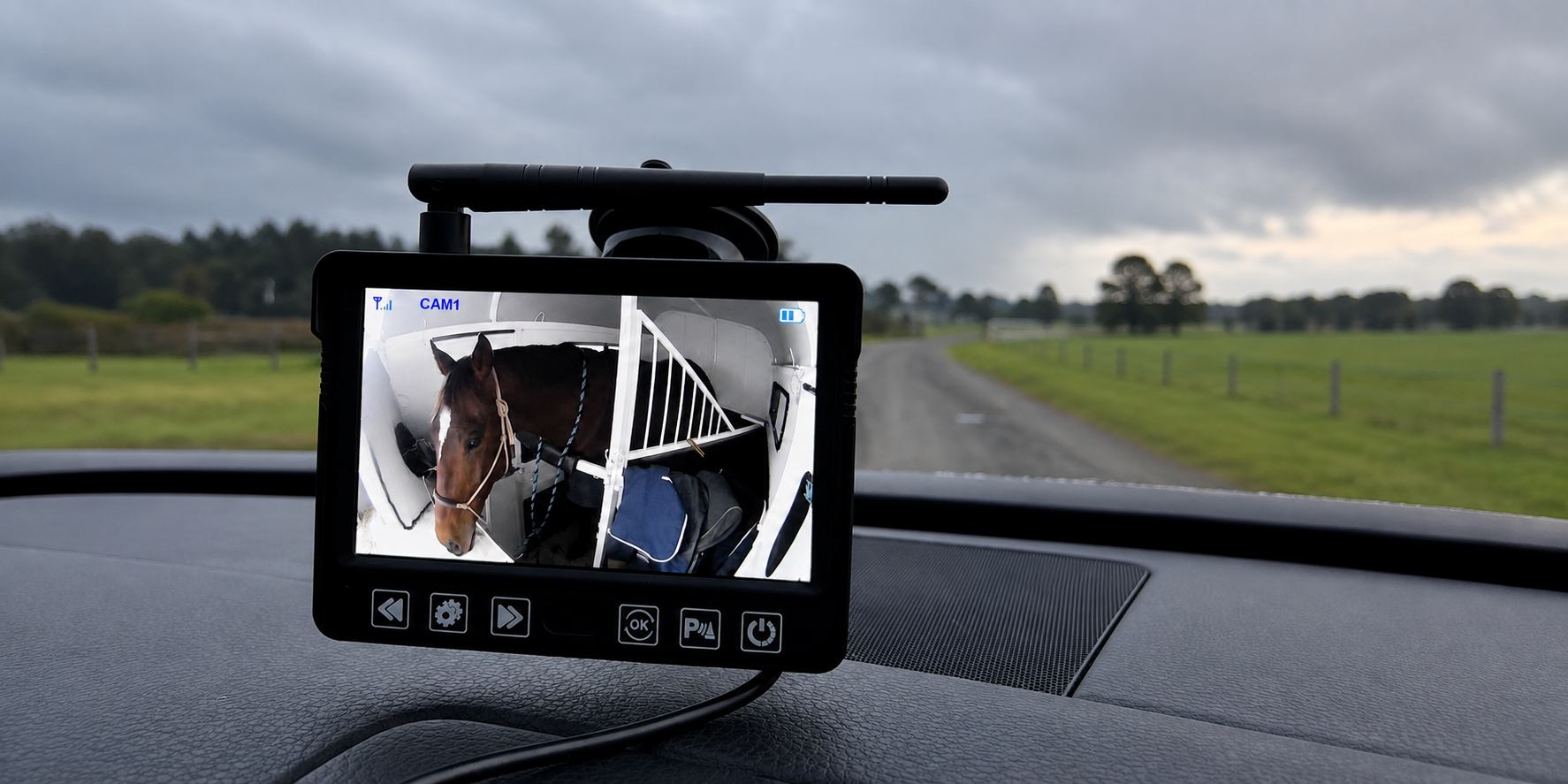
For riders who prefer a separate screen, the Equine Eye Venture provides high-definition footage through its included monitor and is designed for trailers, larger trucks and goosenecks.
Understanding terms such as 4G, WiFi, Bluetooth, SIM card, playback and HD video makes comparing horse cameras much easier. More importantly, it helps you choose a system that will work where your horses actually live and travel.
Explore all three models and find the right monitoring solution for your horses on the Equine Eye website.
Share:
Where should my horse stand in the float? A guide to safer horse transport
Signs my mare is in season: what to look for and how a horse camera can help